







%20.avif)
Software tool that allows us to transform and model data in the data warehouse.
DBT supports ELT (Extract, Load, Transform) process. Data is extracted, loaded into a data warehouse, and then transformed using DBT.
Shift from ETL to ELT has increased the popularity of DBT.
How DBT Differs from Other ETL Tools:
While traditional ETL tools focus on moving and transforming data before it reaches the warehouse, DBT operates directly within the Datawarehouse.
Capabilities of DBT:
- Performance: By transforming data directly in the warehouse, the computational power of modern data warehouses (Snowflake, Big Query, and Redshift) is enhanced.
- Version Control: DBT uses SQL and Jinja2, which helps in version control. This ensures transparency and traceability of changes made to data models.
- Data Modeling: DBT offers a strong framework for creating and maintaining data models. SQL-based reusable models that are simple to maintain.
- Testing and Documentation: Data transformations can be automatically tested with DBT, thus ensuring accuracy and integrity. It automatically creates documentation, offering insight into the data transformation procedure.
- Workflow management and collaboration: DBT makes it possible for team members to work on the same project at the same time, which promotes cooperation. By integrating with version control systems, it facilitates an organized change and release workflow.
Transformation flow in DBT:
- DBT has native integration with cloud Data Warehouse platforms.
- Development: Write data transforming code in .sql and .py files.
- Testing and documentation: It is possible to perform local tests on all models before submitting them to the production repository.
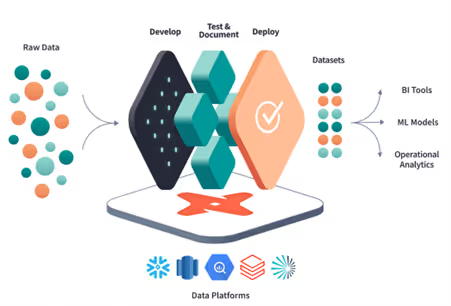
- Deploy: Deploy code in various environment. Version control enabled by Git allows for collaboration.
Versions of DBT:
There are two versions of DBT:
- DBT Core: It is an open-source command-line tool that allows for local data transformation.
- DBT Cloud: It is a web interface that enables fast and reliable implementation of DBT. Through this interface, it is possible to develop, test, schedule, and visualize models.
Core components of DBT:
- Models: SQL queries that define data transformations.
- Tests: Ensure data quality by validating models.
DBT supports both built-in tests (like unique or not null) and custom tests defined in SQL.
- Snapshots: Track historical changes in data.
- Documentation: Auto-generates documentation for clarity on data processes.
- Macros: Reusable SQL code snippets.
- Data: This directory is used to store CSV files or other data sources used for testing or development purposes.
Basic commands in DBT:
dbt init: Initializes a new dbt project.
dbt debug: Runs a dry-run of a dbt command without actually executing the command.
dbt compile: Compiles the SQL in your dbt project, generating the final SQL code that will be executed against your data warehouse.
dbt run: Executes the compiled SQL in your data warehouse.
dbt test: Runs tests defined in your dbt project, checking for errors or inconsistencies in your data.
dbt deps: Installs dependencies for your dbt project.
dbt docs generate: Generates documentation for your dbt project.
dbt docs serve: Serves the documentation generated by dbt docs generate on a local server.
dbt seed: Seeds your data warehouse with initial data.
dbt snapshot: Takes a snapshot of your data warehouse, capturing the current state of your data.
dbt snapshot-freshness: Checks the freshness of your snapshots and generates a report indicating which snapshots need to be refreshed.
dbt run operation: Runs a custom operation defined in your dbt project.
For more updates like this, please get in touch with us.